

Coupons
ai& supports promotional discount codes. If you have a coupon code, enter it on the billing page to get a discount on your next credit top-up — you still receive the full credit amount you selected.
How it works
Section titled “How it works”When you apply a coupon:
- You pay less — the coupon reduces the amount charged to your card
- You get full credits — your balance is credited with the amount you originally selected
- No expiry on credits — credits don’t expire, regardless of how you purchased them
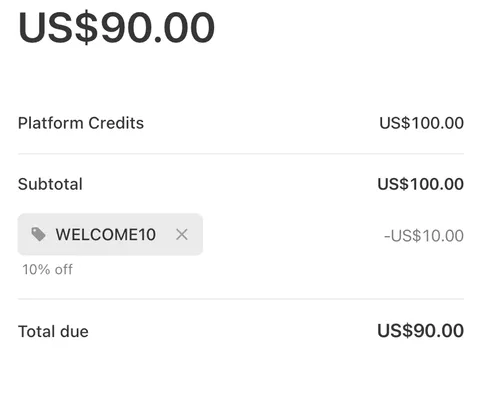
Example: You select $100 of credits and apply WELCOME10 (10% off). Stripe charges your card $90. Your account balance goes up by $100.
Applying a coupon
Section titled “Applying a coupon”-
Go to the billing page at console.aiand.com/settings/billing.
-
Enter the coupon in the “Redeem a Code/Coupon” panel and click “Apply.” Case and spacing don’t matter. The same box takes redemption codes, and it works out which one you entered.
-
Choose an amount. The Purchase Credits window opens with the coupon attached and shows what you will pay, for example “You pay $50.00 for $100.00 of credits.” If the coupon needs a minimum purchase, the window says so.
-
Click “Purchase.” Stripe’s secure checkout opens in a new tab with the discount already applied.
-
Complete payment. Once processed, your balance is credited with the full amount you selected.
The coupon stays attached to your next purchase until you complete one or remove it with ✕. Only organization admins can apply a coupon here, the same as a redemption code.
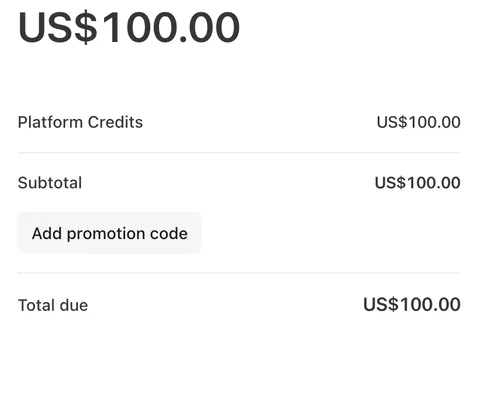
You can still type a code on Stripe’s checkout page instead, with “Add promotion code”, when no coupon is attached:
Viewing applied coupons
Section titled “Viewing applied coupons”Your payment history on the billing page shows:
- Credits — the amount added to your balance
- Amount — what was actually charged to your card
- Coupon — the coupon code applied (if any)
Troubleshooting
Section titled “Troubleshooting”| Message | What it means |
|---|---|
| This code wasn’t recognised. Please check for errors and try again. | Neither a coupon nor a redemption code has that name. Double-check it with whoever sent it. |
| This coupon has expired and can no longer be used. | The coupon’s validity period has ended. Ask the issuer for a new one. |
| That coupon has been fully used | The coupon has reached its usage limit. |
| That coupon can’t be used by this organization | The coupon was issued for a different account. |
| That coupon is for USD purchases, and this organization bills in JPY | The coupon has no discount or minimum set for your organization’s billing currency. |
| Coupons apply to card purchases, which aren’t available on invoice billing | Organizations billed by invoice don’t buy credits by card. |
| … does not meet the minimum amount requirement | Raise the purchase amount to the coupon’s minimum. |
| Another refusal when you click “Purchase” | Some coupons are for first-time purchases only, or single-use per customer. Remove the coupon to buy at full price. |
Questions?
Section titled “Questions?”If you have a coupon that isn’t working or need help, contact support@aiand.com.